Lesson 8/18 — Finish the setup by proving you can find the record again. A useful workspace connects the finished Batch back to material deliveries and forward to distribution, while preserving documents and inventory history.
Before you start
The saved training Batch from lesson 6 and the PIF gap review from lesson 7. Distribution/customer records should be created only when there is a real or clearly labelled training event.
Follow the traceability chain
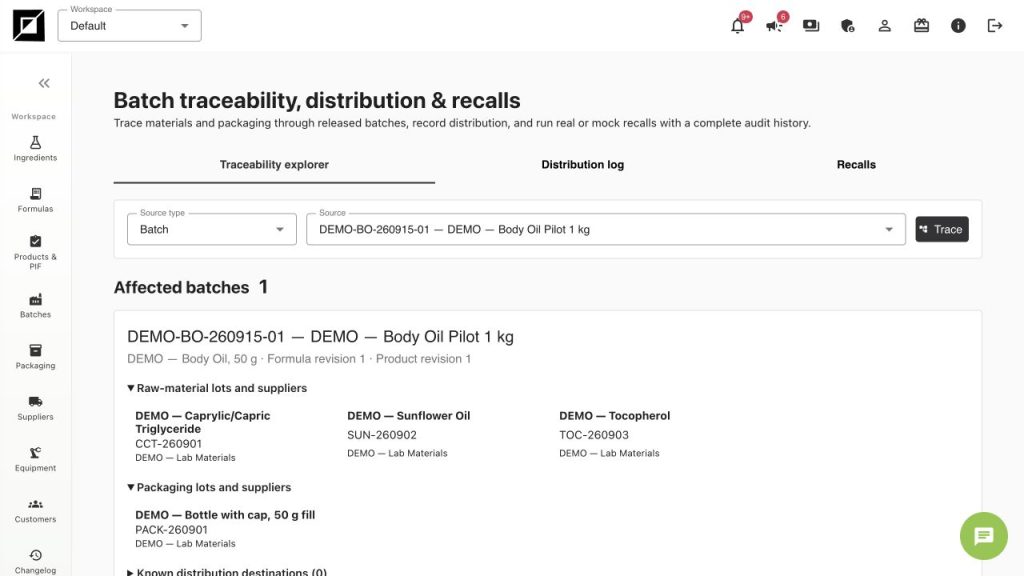
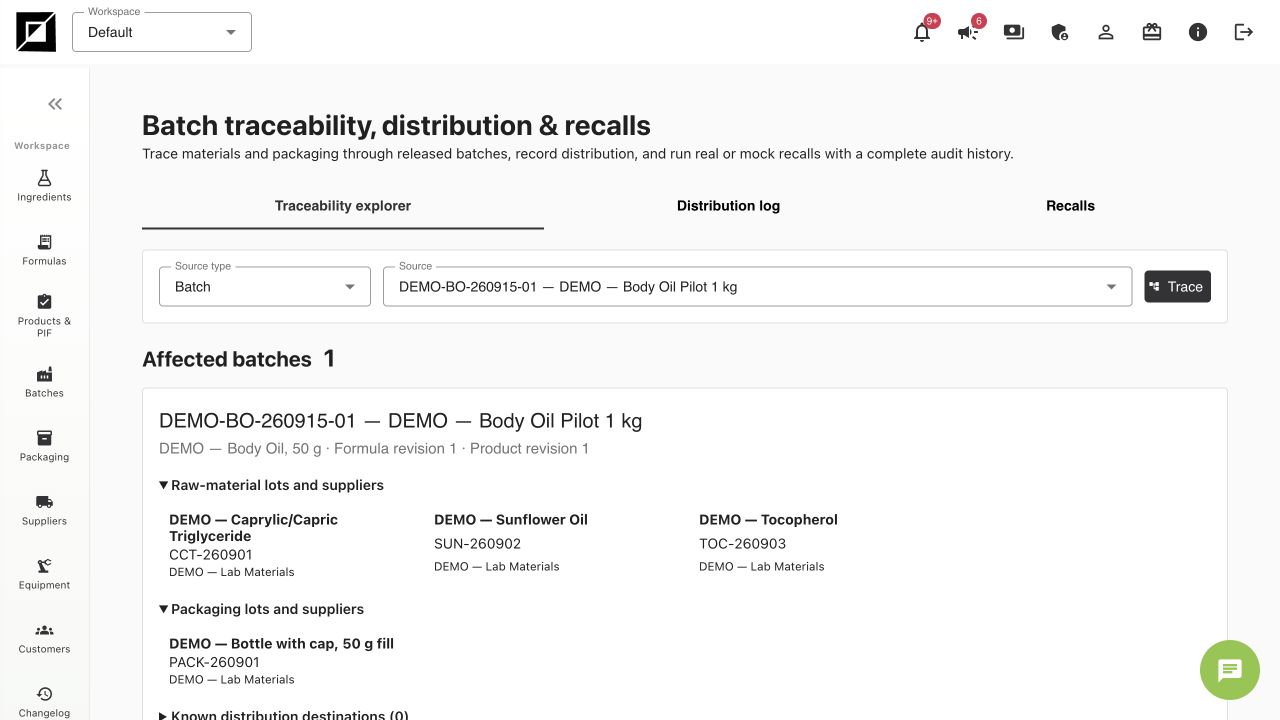
- Open Traceability & recalls. Select Batch as the search object and find DEMO-BO-260915-01.
- Review the linked Product/Formula reference and ingredient lots CCT-260901, SUN-260902 and TOC-260903. Check packaging lot PACK-260901 as well.
- Open a material lot and its Used in links to see the batches related to that delivery. This is the cross-check you need when investigating a supplier lot.
- Review Tracking inventory filtered by batch index. The DEMO movements consume exactly 700 g, 290 g, 10 g and 20 sets. An inventory screenshot is narrower than a complete traceability or distribution record.
Record distribution when it actually happens
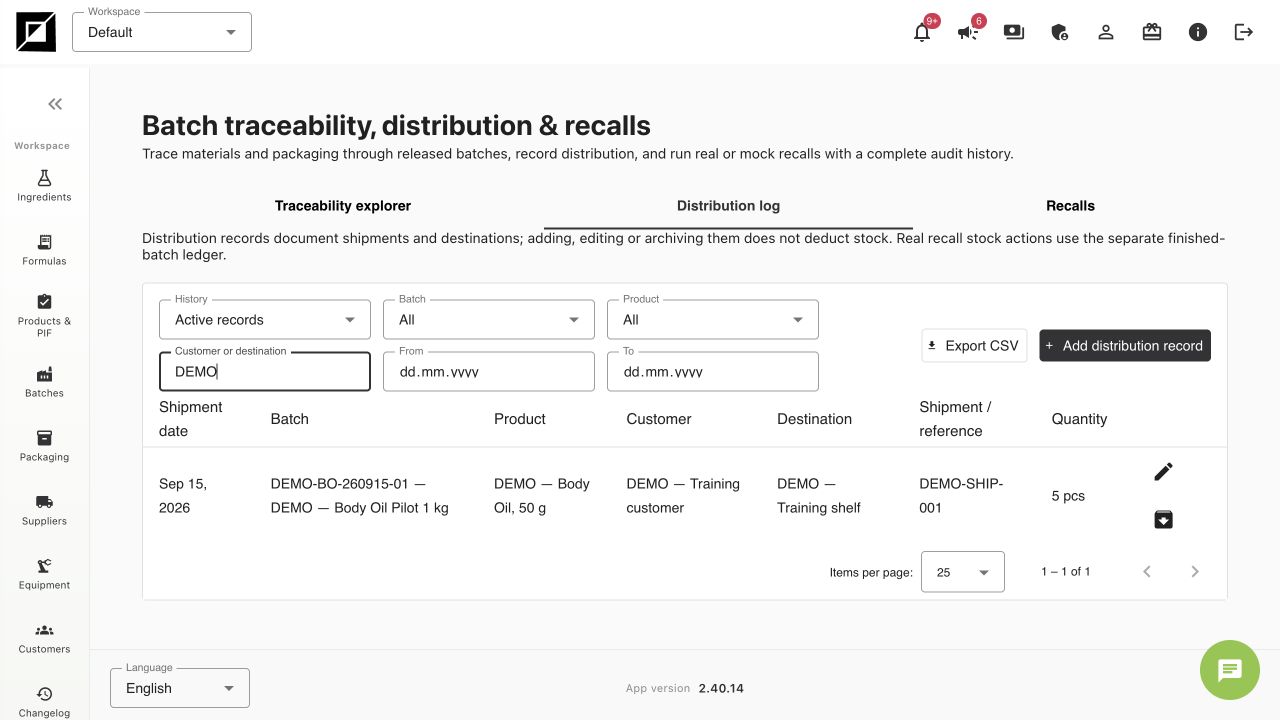
- Use the Distribution log section in Traceability & recalls to add an actual shipment/distribution record for the selected completed Batch.
- Select the correct customer/destination, record shipment reference/date, quantity and unit, and save. Do not equate a 1,000 g bulk batch with 1,000 finished pieces. Our training batch has 20 filled units.
- For this course, a separate fictional training shipment uses DEMO — Training customer, reference DEMO-SHIP-001 and 5 pieces. It is a local record only; no customer message or shipping action is sent.
- Distribution is separate from ingredient and packaging consumption. Check finished-batch stock and linked shipment movements where available; historical documentary records may have no stock movement. Reopen the distribution history and verify that the customer, batch and quantity remain linked. For a recall or mock recall, inspect the affected Batch and distribution records, then follow your authorised process; do not send notices from a practice exercise.
Preserve the history and a backup
- Use the entity Changelog and inventory movement history to review changes. Investigate stock differences using the recorded operations and reasons rather than rewriting receipt quantities.
- If a stock correction is required, review the operation details and use the appropriate correction or Undo/reversal control with a reason. An undo should leave evidence; never use it on unrelated records while practising.
- As workspace owner, open Account → Workspaces → Download workspace backup. Wait for the job and download the completed archive when available. Store it according to your organisation’s access rules.
- A backup export does not itself prove a successful restoration. Keep the archive, exported production documents and version references organised before major imports or cleanup.
A repeatable working routine
| When | Review |
|---|---|
| Before purchasing | Exact grade, supplier, documents and intended stock unit |
| At receipt | New lot identifier, purchased quantity, cost, BBE and evidence |
| During development | Formula total, method, measured tests and saved Formula Version |
| Before production | Correct Product Version, actual lots, available stock and equipment |
| At completion | Actual yield, packing balance, costs, stock movements and saved status |
| Before commercial release | Required document package, assessments and authorised decisions |
| At shipment | Batch, customer/destination, shipment reference and actual quantity |
| Periodically | Expiry/reassessment queue, equipment dates, history and backups |
Final exercise
Starting from DEMO-SHIP-001, find its Batch, the Product Version and the raw-material/packaging lots. Then explain why Batch Done is different from Product/PIF approval, and why Purchased quantity differs from In stock. If you can do that without creating duplicates or guessing the next screen, the initial setup is complete.
Worked examples in the application
Click any screenshot to read it at full size. All DEMO records are fictional local examples.
Expected result
You can follow material → batch → customer links, distinguish stock and document states, and repeat a consistent purchase/development/production/document routine.