Lesson 3/18 — Now connect catalogue records to physical material. Two deliveries of the same Ingredient can have different lot numbers, prices, expiry evidence and stock balances.
Before you start
The supplier and three Ingredient records from lesson 2. Decide which unit each purchased quantity uses.
Create the first delivery lot
- Open Ingredient lots → Add ingredient lot, or add a lot from the selected Ingredient’s Lots section. Select the correct Ingredient.
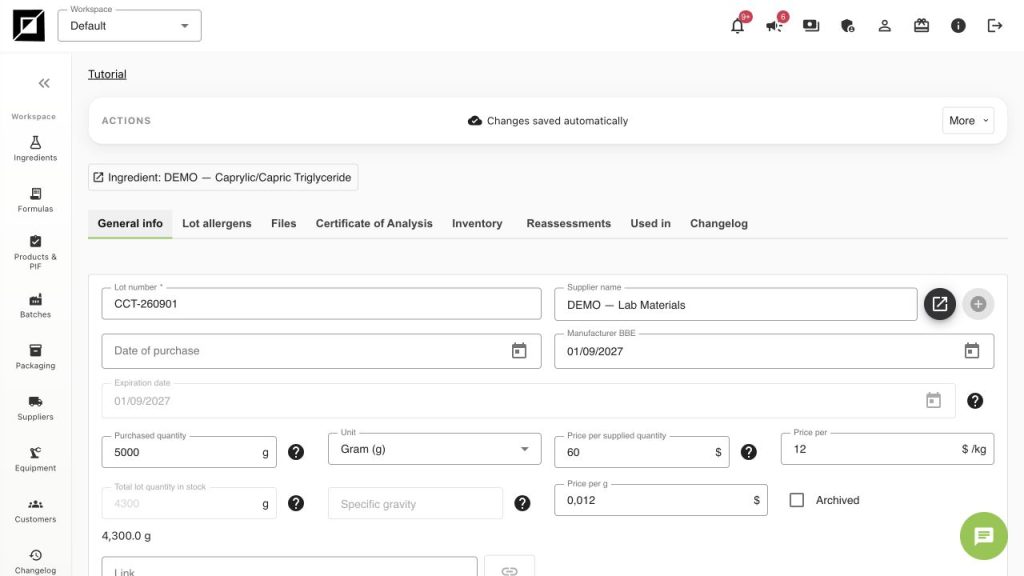
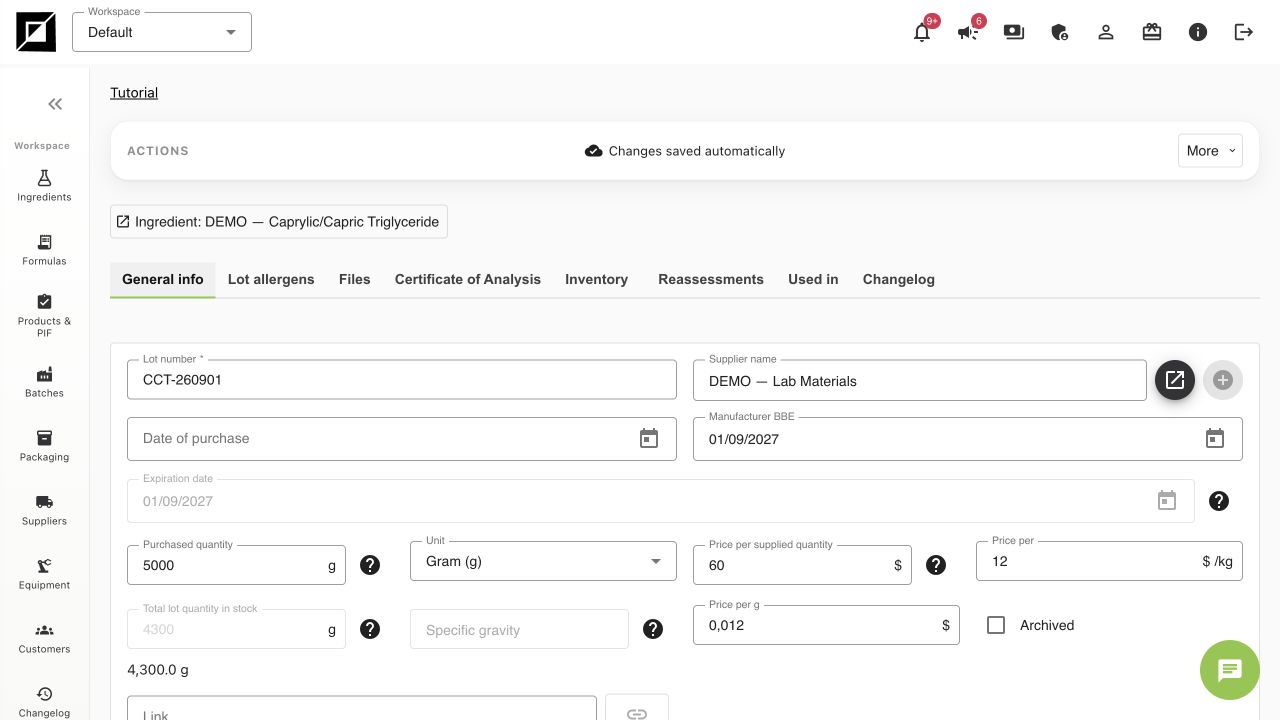
- Enter lot number CCT-260901 and select DEMO — Lab Materials as Supplier name. Keep the supplier’s actual lot identifier in real work.
- Set Purchased quantity = 5,000 and Unit = Gram (g). For the exercise use Price per supplied quantity = $60; the resulting cost is $12/kg and $0.012/g.
- Set the starting Total lot quantity in stock to 5,000 g. If the field is locked on a saved lot, use the stock edit/adjustment control rather than treating Purchased quantity as the remaining balance. Explain every later adjustment in the inventory history.
- Record purchase and manufacturer BBE dates when supported by your supplier evidence. Our 01/09/2027 date is fictional. Do not use a training expiry as a real shelf-life decision.
- Wait for autosave. Check lot number, Ingredient, supplier, unit and price before recording the next delivery.
Create all practice receipts
| Ingredient lot | Starting stock | Example cost/kg | Total purchase cost |
|---|---|---|---|
| CCT-260901 | 5,000 g | $12 | $60 |
| SUN-260902 | 2,000 g | $8 | $16 |
| TOC-260903 | 100 g | $60 | $6 |
Keep documents attached to the correct object
Use Files on the lot for delivery-specific documents, including a supplier COA. The Certificate of Analysis tab records criteria, results and approval information; it is not evidence that a laboratory test took place. In this exercise no COA has been approved. Use Reassessments to record a justified review rather than silently rewriting the manufacturer date.
Stock and traceability checks
- One Ingredient can have several lots. Create a new lot for a new physical delivery instead of overwriting an old identifier.
- In stock is the current balance; Purchased quantity is the receipt quantity. After the pilot in lesson 6, the expected raw-material balances will be 4,300 g, 1,710 g and 90 g. The screenshot was captured after that pilot, so it shows the later 4,300 g balance.
- Premium/Enterprise expose Track inventory and the movement ledger; Professional exposes inventory warnings, without automatic lot deduction. A visible lot number alone does not prove stock was deducted.
- Use Used in on a saved lot to investigate related formulas and batches. If dates or documents are missing, keep the gap visible.
Worked examples in the application
Click any screenshot to read it at full size. All DEMO records are fictional local examples.
Expected result
Three physical practice lots have explicit stock, units, supplier links and costs. You can distinguish the catalogue, receipt quantity and remaining balance.